Haruhi

2008年10月18日星期六

How to Make an AiO [Reloaded Edition]

Type: ISO | Size: 966 MB


Description:

Have you ever wondered how they make those neat AiO's [All-in-One's]? Look no further. After 5 long days, I am here to bring you, "How To Make an AiO [Reloaded Edition]."

Everything you need to know about making an AiO is included.

This is a new version of my first, "How To Make an AiO."

************************************************** *****************************************

Includes:

Intro video

"Bad Stone" song by: The Crystal Method

AutoPlay Media Studio 6.0
AutoPlay Media Studio 6.0 serial
AutoPlay Media Studio 6.0 patch
AutoPlay Media Studio 6.0 [off-line web page]
AutoPlay Media Studio 6.0 [screenshot]

Setup Factory 7.0.1.0 [pre-patched]
Installer created by: vertigo173
Setup Factory 7.0.1.0 [off-line web page]

AveIconifier 2.0 [for converting ICO to PNG & PNG to ICO for AiO icons]
AiO and Installer created by: vertigo173
"How To Make an AiO" [tutorial video by: vertigo173]
Includes both Techsmith AVI version & WMV-HD version
TechSmith Screen Capture Codec 2.0.6

Windows Media Player 10
Windows Media Player 11 Beta 2 [for Genuine Windows XP only]

669 Designer Fonts
6,193 Icons
153 Sound Effects

Web Browsers 8-in-1 [created during the "How To Make an AiO" tutorial video]
AiO created by: vertigo173

************************************************** *****************************************

Tutorial Video:

"How To Make an AiO"
by: vertigo173

File Size: 396 MB

Resolution: 1280x960
Audio: None
Codec: Techsmith
Running Time: 74 minutes, 26 seconds

*Note: Make sure you install the Techsmith codec before watching the video.

&

"How To Make an AiO"
by: vertigo173

File Size: 202 MB

Resolution: 1280x960
Audio: None
Codec: Windows Media Video [High Definition]
Running Time: 74 minutes, 26 seconds
Digital Rights Management: None
Bit Rate: 8 mbps
PHP Code:
RapidShare: Easy Filehosting

标签: ,

2008年10月2日星期四

Auto Screen Recorder Pro v2.1

AutoScreenRecorder Pro v2.1.293

AutoScreenRecorder 2.1 Pro is an easy-to-use and powerful screen recording software for recording screen actions into Flash movies (SWF) and AVI videos. It provides the edge you need to succeed in recording activities and movie steams, showing operation steps, making demos and videos for your needs.

It comes with a number of features that can deliver the highest quality video files. AutoScreenRecorder 2.1 Pro offers easy-to-use user interface and flexibility for your interactive experience.

Save anything you see or do on your screen -- moving the mouse to click a button, typing some text, or select some menu -- and playback later. You can add recorded videos to your products or services to save your time to explain, and provide better experience for your customers. The Flash movie file can be published to the Web in no time.

Download 1.30 MB
Code:


Keygen 89.01 KB


Code:


PASSWORD

Code:
www.smartpro.org

标签: ,

River Past Screen Recorder Pro 7.6.1


Image
River Past Screen Recorder Pro 7.6.1


Image

River Past Screen Recorder is River Past's award winning screen video recorder.

It is the fastest screen video recorder on the market, with a speed comparable to TechSmith's Camtesia Studio, and way better than any other similar software we have tested.

Capture AVI video from the full screen, a window, a rectangle region, or a defined area around the cursor. Decide whether you want the cursor image to be included. You can even record audio into the AVI, from the microphone, line-in, or speakers.

River Past Screen Recorder Pro allows you to record to WMV files using Microsoft's Windows Media Screen codec, which is specialized in producing high quality and small screen videos.

River Past Screen Recorder - Features

Input Control

River Past Screen Recorder can capture AVI from the full screen, a window, a rectangle region, and a defined area around the cursor.

Drag-and-drop operation is used to define the window or the rectangle to be captured. When capturing from a window, the capture area follows the window, even if the window has been moved around the screen.

You can define the maximum frame rate to be captured, and thus control the output file size.

Output Formats

River Past Screen Recorder supports a wide range of input formats.

3GPP2 Mobile Video
3GP Mobile Video
Audio Video Interleaved
Windows Bitmap
DivX Video
Animated GIF
JPEG Image
Matroska Video
QuickTime Movie
MPEG-4 Video
MPEG-1 Video
MPEG-2 Video
OGG Media
RealMedia
Windows Media Video
XVID Video

Hot Keys

Use hot keys to control the recording. You can define the hot keys to the combinations you prefer. Minimize River Past Screen Recorder, and start and stop recording by the hot keys. You can even pause the recording.

Windows Media Video

River Past Screen Recorder Pro allows you to record to WMV files using Microsoft's Windows Media Screen codec, which is specialized in producing high quality and small screen videos.

Record the video and post it on the web without any editing and conversion.

Requirements

Buy Options


Screen Recorder 7.6.4
Single User License
Download US$ 39.95
MSRP US$ 49.95
Instant Activation
(File size: 2.38MB)
Download Info
Screen Recorder Pro 7.6.4
Single User License
Download US$ 59.95
MSRP US$ 79.95
Instant Activation
(File size: 6.42MB)
Download Info

More Purchase Options


30-day money back guarantee
More Info

Hardware

River Past Screen Recorder is tested to run on any PC with a Pentium III/Celeron CPU of 500 MHz or above. A sound card is required.

It may perform on a PC with lesser spec. However, we will not provide technical support if your PC is below the minimum specification we provided.

Operation Systems

River Past Screen Recorder supports Windows 98 Second Edition, Windows ME, Windows 2000, Windows XP, and Windows Vista.

DirectX

River Past Screen Recorder requires DirectX 8.0 or above. We strongly recommend that you always use the latest the latest DX (currently 9.0b) because it provides better stability and performance.

WMF

For WMV output in River Past Screen Recorder Pro, you must have Windows Media Format runtime 9 installed. We provide it in a separate download package.


Image

Code:
http://rapidshare.com/files/81174476/Scr.Rec.Pro.v7.6.1.7z


Image

Code:
www.oxyg3n.ca

标签: ,

ACA Screen Recorder 3.50

ACA Screen Recorder 3.50

Image

Records AVI movies directly from your screen, for software presentations, software training, demos, tutorials, and fun!

ACA Screen Recorder is a screen recording software, it captures the actions from your Windows screen and saves it as a standard, easily edited, AVI (Audio-Video Interleaved) movie file. This format can be played under Windows, as well as the Internet, unlike other programs that use proprietary formats that may need special viewers and be difficult, if not impossible, to edit.

ACA Screen Recorder Features:

System-wide hot keys to start, pause, stop screen recording.
Easy precision visual screen area or window selection.
Optional sound, with choices for recording quality.
Show flashing rectangle when recording or paused.
Capture in any screen color depth
Automatically incrementing file names for captures using filename template.
Multiple video compression choices
Convenient, user-definable hot keys, including 'pause recording'.
Frame rate and video compressor choices.
Audio compressor choices.
Configure video compressor.
Mouse cursor recording can be turned on or off, true shape of the cursor is recorded.

Download:

Code:
http://rapidshare.com/files/131784023/ACASRv3.50.cw.rar


Pass:
Code:
mapster@cw

标签: ,

Deskshare My Screen Recorder v2.51

Quote:
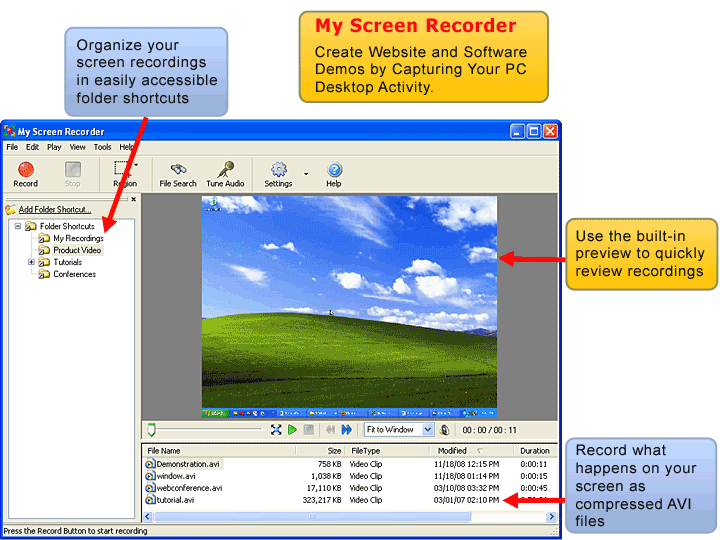
Create Website and Software Demos by Capturing Your PC Desktop Activity.


My Screen Recorder captures your PC desktop activity into standard AVI video files. This screen capturing tool can record anything you see on the computer screen, including the entire desktop, windows, menus, cursors, and even video with sound. My Screen Recorder helps you make a video of the screen movements and save them for later playback.


Seeing is believing! Use My Screen Recorder to make people witness what you want convey through an audio-visual medium. Demonstrate a product, create a presentation with your own audio narration, make a voiceover tutorial, or walk through a Website review.

Record a part of the screen or the entire desktop with My Screen Recorder. You can make small size and high-quality screen recordings and save them as standard AVI files for later playback. My Screen Recorder organizes your recordings into Folder Shortcuts for easy management.


It is a powerful communication software that simplifies the way you share information through an audio-visual medium. Anyone interested in communicating by showing, telling, and sharing would find My Screen Recorder essential.

For additional features you can try our professional version, My Screen Recorder Pro, that allows you to create Flash and Windows Media screen recordings and distribute them on a CD or DVD as a self-playing executable file. See the comparison chart for a complete feature list.


With My Screen Recorder you can:

Record your desktop activities to compressed AVI video files.
Use a connected microphone to narrate audio to your desktop screen recordings.
Make screen recordings of the entire desktop or a portion of the screen.
Automatically detects and selects the best audio line while recording from your PC speakers.
Create Demos of anything displayed on your screen.
Use the built-in preview to quickly review the recorded videos.
Produce small size AVI files with high-quality video.
Organize your screen recordings in easily accessible folder shortcuts.


Code:
http://rapidshare.com/files/13453786/Deskshare.My.Screen.Recorder.v2.51-DVT.rar

Key included Wink

Image

标签: ,

2008年9月29日星期一

101 Sex Jokes and Comix

101 Sex Jokes & Comix

Size: 4754 KB | Pages 102 | P-Date 2008 | PDF

Each page has one joke and a comic picture. Well, let’s start with some great laughter and then at the end is a bonus section called “A Few Sick Ones For You!”

No PDF Passwords... Already removed.


Click Me


标签: ,

The Mystery Method How to Get Beautiful Women Into Bed

The Mystery Method How to Get Beautiful Women Into Bed

Size: 1448 KB | Pages 240 | Feb 6, 2007 | PDF  

“One of the most admired men in the world of seduction” (The New York Times) teaches average guys how to approach, attract and begin intimate relationships with beautiful women
For every man who always wondered why some guys have all the luck, Mystery, considered by many to be the world’s greatest pickup artist, finally reveals his secrets for finding and forming relationships with some of the world’s most beautiful women. Mystery gained mainstream attention for his role in Neil Strauss’s New York Times bestselling exposé, The Game. Now he has written the definitive handbook on the art of the pickup.
He developed his unique method over years of observing social dynamics and interacting with women in clubs to learn how to overcome the guard shield that many women use to deflect come-ons from "average frustrated chumps."
His tips include:
*Give more attention to her less attractive friend at first, so your target will get jealous and try to win your attention.
*Always approach a target within 3 seconds of noticing her. If a woman senses your hesitation, her perception of your value will be lower.
*Don't be picky. Approach as many groups of people in a bar as you can and entertain them with fun conversation. As you move about the room, positive perception of you will grow. Now it's easy to meet anyone you want.
*Smile. Guys who don't get laid, don't smile.


Click Me


标签: ,

Computer Graphics World


Computer Graphics World

Size: 9150 KB | Pages 84 | Aug, 2008 | PDF

By: Ensemble
Magazine devoted to computer grafix.
( Passwords has been removed ).


Click Me


标签:

2008年9月27日星期六

AutoScreenRecorder Pro v3.0.323

AutoScreenRecorder Pro v3.0.323


AutoScreenRecorder Pro v3.0.323 | 5 Mb

AutoScreenRecorder 3.0 Pro is a powerful and intelligent screen recorder to record anything you see, do and hear on your screen and save it to a video file or Flash movie. It comes with a number of features including codec and video quality options, auto-stop, scheduled recording and a video editor, that you can deliver high quality video files. It supports multiple monitors, long recording and re-recording audio. As well, AutoScreenRecorder 3.0 offers easy-to-use user interface and ScreenZoom that you can enlarge your screen any time. With AutoScreenRecorder, can record your online sessions, web cams, games, software operation steps, training demos, videos and movies. You can easily upload your video to YouTube and the Flash movie file can be published to the Web in no time.

Features:

• Record any area on your desktop, an object area, a window or full screen
• Record mouse pointer with effects
• Easy and automated video file name creation
• Sound recording
• Video editor
• High productivity, time saving features
• High video image quality
• Convert to Flash movie files
• Flexible recording areas and time
• Flexible frame rate
• ScreenZoom
• Annotation features
• Much more...


Download link:


标签: ,

2008年9月23日星期二

WisdomSoft Auto Screen Recorder Pro v3.0.323

WisdomSoft Auto Screen Recorder Pro v3.0.323


WisdomSoft AutoScreenRecorder Pro v3.0.323 | 3.2 MB

Record, Edit and Show! Get the power of an easy-to-use and award winning screen recorder! AutoScreenRecorder 3.0 Pro is a powerful and intelligent screen recorder to record anything you see, do and hear on your screen and save it to a video file or Flash movie. It comes with a number of features including codec and video quality options, auto-stop, scheduled recording and a video editor, that you can deliver high quality video files. It supports multiple monitors, long recording and re-recording audio. As well, AutoScreenRecorder 3.0 offers easy-to-use user interface and ScreenZoom that you can enlarge your screen any time.

With AutoScreenRecorder, can record your online sessions, web cams, games, software operation steps, training demos, videos and movies. You can easily upload your video to YouTube and the Flash movie file can be published to the Web in no time.

Features :
*New video editor
-You can trim your recorded videos frame by frame, and extract images, sound from them, and re-record sound and generate the Flash movie.
*Redesigned high quality recording module
-AutoScreenRecorder 3.0 records your screen in an accurate frame rate and with minimum interference of what you do on your PC, a small footprint.
*Redesigned user interface for easy operation
*Re-recording audio
*New on screen stop button and panning the recording region during recording
*Long recording enabled
-New per minute frame rate. Continues recording to multiple 2G AVI files.
*ScreenZoom
-Enlarge the screen to see what’s going on on the screen at anytime.
*New recording sources
-You can set to record a specific window, and non-rectangular area.
*New recurring recording
-You can set to record at daily, weekly and monthly intervals.
*Mouse click effects
-It can record mouse pointer with click effects.
*Multiple monitor support
-Adding a watermark to your video


download:
Code:
http://rapidshare.com/files/146471925/WisdomSoft.AutoScreenRecorder.Pro.v3.0.323._codehacks.org.rar

标签: ,

How does RapidShare work?

How does RapidShare work?


  • On the homepage, click the "Browse" button.
  • On your computer, choose the file you wish to upload.
  • Click "Upload".
In addition to this you can choose an Internet-Carrier within the premium and collector zone.
After uploading is completed, a new window will appear containing two links.
  • Save the Delete-Link, which enables you to delete the file later.
  • Save the Download Link, in order to be able to download your file again.
Finished!
To send the file to your friends and family, you can copy and paste the download link into an e-mail, or you may just use our e-mail form.

标签:

WisdomSoft AutoScreenRecorder Pro v3.0.323


Download

Record, Edit and Show! Get the power of an easy-to-use and award winning screen recorder!
AutoScreenRecorder 3.0 Pro is a powerful and intelligent screen recorder to record anything you see, do and hear on your screen and save it to a video file or Flash movie. It comes with a number of features including codec and video quality options, auto-stop, scheduled recording and a video editor, that you can deliver high quality video files. It supports multiple monitors, long recording and re-recording audio. As well, AutoScreenRecorder 3.0 offers easy-to-use user interface and ScreenZoom that you can enlarge your screen any time.
With AutoScreenRecorder, can record your online sessions, web cams, games, software operation steps, training demos, videos and movies. You can easily upload your video to YouTube and the Flash movie file can be published to the Web in no time.
Features :
New video editor
You can trim your recorded videos frame by frame, and extract images, sound from them, and re-record sound and generate the Flash movie.
*Redesigned high quality recording module
AutoScreenRecorder 3.0 records your screen in an accurate frame rate and with minimum interference of what you do on your PC, a small footprint.
*Redesigned user interface for easy operation
Re-recording audio
New on screen stop button and panning the recording region during recording
Long recording enabled
New per minute frame rate. Continues recording to multiple 2G AVI files.
ScreenZoom
Enlarge the screen to see what’s going on on the screen at anytime.
*New recording sources
You can set to record a specific window, and non-rectangular area.
*New recurring recording
You can set to record at daily, weekly and monthly intervals.
Mouse click effects
It can record mouse pointer with click effects.
*Multiple monitor support
*Adding a watermark to your video.
Download WisdomSoft AutoScreenRecorder Pro v3.0.323:
http://rapidshare.com/files/145989299/WisdomSoft.AutoScreenRecorder.Pro.v3.0.323.WinAll.Cracked-BRD.rar.html

标签: ,

测边栏大幅广告300x250

订阅feed

内测边栏长幅广告160x600

技术支持

© 2007 Haruhi

Powered by Blogger.com 

Template by wuyuntao

外侧边栏长幅广告120x600

版权声明

Creative Commons License

本博客采用 知识共享署名-非商业性使用-禁止演绎 2.5进行许可。